Troubleshooting Missing Apps in Android Auto: A Quick Guide
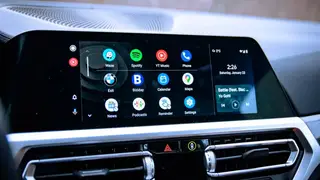
Android Auto users often find that apps disappear from the car display, typically because the phone's battery optimization automatically disables unused apps. To restore a missing app, simply open it on your phone and reconnect to Android Auto, which signals the system to reactivate it. The same process can be used to hide apps by disabling them through device settings.
Android Auto's vast user base of roughly 250 million drivers makes the sudden disappearance of apps a widespread annoyance. This phenomenon is frequently triggered by power-saving mechanisms on smartphones, which place rarely used applications into a dormant state to extend battery life.
To regain control, users can modify background usage limits within their device settings to stop automatic deactivation. Additionally, the car display's app list can be tailored through the connected devices menu, though only platform-compatible tools—such as navigation and messaging—are eligible, while media streaming and gaming titles remain excluded.
This recurring issue could impact a large segment of the 250 million Android Auto users, potentially leading to distracted driving as individuals attempt to troubleshoot on the road. The straightforward remedy may reduce frustration, but the underlying aggressive battery management could continue to cause unexpected changes. This dynamic may prompt future software updates to prioritize clearer user control over automatic background processes, shaping how drivers interact with their vehicle interfaces.